
3 Key Risks in GitHub Copilot and How to Avoid Them
By cloudedgeEverything you need to know before working with GitHub Copilot

GitHub Copilot has become a significant tool for developers, helping them write code faster and more efficiently. According to GitHub data, over 1.3 million developers already use it, and 77% report improved productivity. However, like any AI-based tool, it has security risks that are important to understand. In this article, we’ll review the three main risks and present practical solutions to protect your organization’s code.
What is GitHub Copilot and How Does It Work?
GitHub Copilot is an AI-powered code assistant developed by GitHub in collaboration with OpenAI, using advanced LLM models (initially Codex, now GPT-4) trained on billions of lines of public code.
How it works in practice: When you use GitHub Copilot, it collects and analyzes all files in your project folder, including:
- The code you’re currently working on
- Comments and documentation
- Imports, dependencies, and configuration files
- Variable and function names
All files are sent to GitHub’s servers for processing, where code suggestions are generated within seconds.
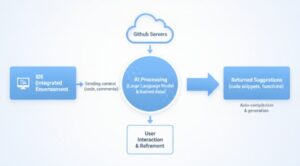
Here’s where the risk begins: All collected data is sent to external servers. If your code contains API keys, passwords, or sensitive information, they will be sent too.
1. Sensitive Data Leakage and Business Secrets
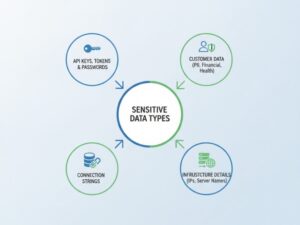
One of the most significant risks in using GitHub Copilot is the potential for sensitive data leakage. During the workflow, code is sent to GitHub servers for processing. Sometimes developers accidentally expose additional information that shouldn’t leave the organization:
- API keys, tokens, and passwords
- Customer data
- Connection strings
- Internal IP addresses and server names
GitHub states it doesn’t use customers’ private code for model training. However, the CamoLeak vulnerability exposed a Prompt Injection flaw that revealed code from users’ private repositories. Even if data isn’t used for training, sending it to an external AI service is already a risk.
The Solution: Content Exclusion
Content Exclusion is a mechanism that tells GitHub Copilot: “Don’t send these files to the servers at all.”
Step 1: Protection Against Agents
Configure Content Exclusion through the GitHub website in the Repo’s Settings tab. Enter all files containing sensitive information:
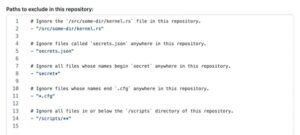
Step 2: Active Blocking in IDE When File is Open

Tip: Also add syntax highlighting extensions like dotenv to the block list, as they change the file’s language in the IDE.
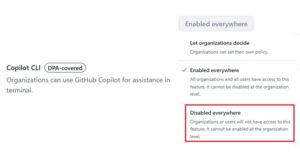
Step 3: Protection Against Copilot CLI
Since CLI doesn’t support path-based blocking, disable it entirely in your organization’s GitHub settings by selecting “Disabled everywhere”:
2. Vulnerable Code and Security Issues in Code Suggestions
GitHub Copilot generates code suggestions based on patterns learned from billions of lines of public code. The problem: much of this code was written without security awareness and contains known vulnerabilities. According to research from New York University, 40% of code suggestions contain potential vulnerabilities.
The Solution: Zero-Trust Policy and Code Review
Regardless of where the code came from, the developer is the owner and responsible for every line that enters production. More organizations are adopting a Zero-Trust approach at the code level.
CODEOWNERS
A mechanism that defines who is responsible for which parts of the repository:

When a file is changed, GitHub automatically identifies the owner and ensures the Pull Request cannot merge without their approval.
Rulesets
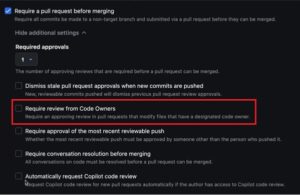
The enforcement mechanism that allows defining rules at the branch level to ensure no merge occurs without meeting defined conditions. Create rules in GitHub’s Repo Settings:
- Require a pull request before merging
- Require review from Code Owners
- Set required number of approvals
Organization Custom Instructions
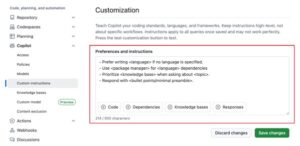
Define secure working rules for Copilot through the Organization Custom Instructions mechanism. These instructions are injected into every developer query:
- “Always use encryption functions of type X”
- “Perform sanitization on all input”
- Prioritize specific security libraries
3. Use of Public Code and Copyright Infringement
GitHub Copilot may suggest code that is an exact copy of copyrighted code or code under restrictive licenses. The main risk here is “Copyleft” licenses like GPL. If your organization mistakenly uses GPL-licensed code, it may be legally required to open all product source code to the public.
The Solution: Public Code Filter
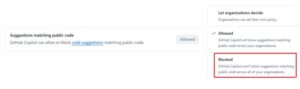
GitHub provides a simple built-in solution through the Public Code Filter mechanism. This filter checks whether suggested code is similar to public code. If so, it blocks the suggestion before it reaches the developer’s screen.
To enable this setting, go to Organization Settings on the GitHub website and under “Suggestions matching public code” select “Blocked”:
Summary
Risk |
Solution |
| 1. Sensitive Data Leakage | Content Exclusion, Language Blocking, Disable CLI |
| 2. Vulnerable Code | CODEOWNERS, Rulesets, Custom Instructions |
| 3. Copyright Issues | Public Code Filter |
GitHub Copilot is an amazing tool that changes the rules of the game, but rapid development shouldn’t come at the expense of your organization’s information security. The protection mechanisms presented here are the first and essential step to significantly reduce AI risks in your organization.